100 Flowers Dragon Coloring Book Adults
Creating a consistent, high-quality coloring book for the Amazon Kindle Direct Publishing (KDP) platform takes more than just a handful of pretty illustrations. It demands a reliable set of assets that meet technical specifications, support a smooth publishing workflow, and appeal to a specific adult audience. The 100 Flowers Dragon Coloring Book Adults digital interior package addresses exactly that need. It provides a turnkey resource for entrepreneurs, marketers, and publishers who want to bypass the time‑intensive design phase and move directly into product assembly and launch. Whether you are building your first low‑content book or expanding an existing catalog, understanding how this interior fits into your broader process can reduce friction and improve the final product.
What the 100 Flower Dragon Coloring Book for Adults Interior Actually Contains
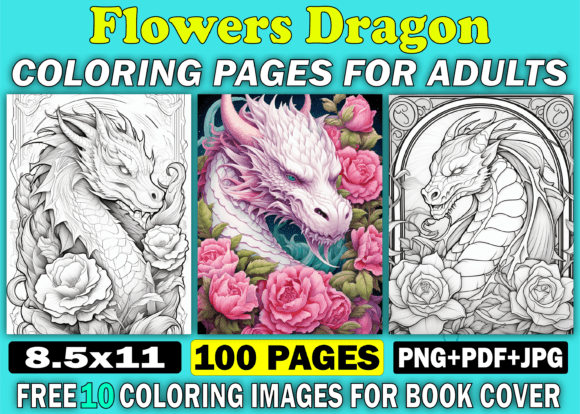
At its core, this downloadable collection is a pre‑illustrated, print‑ready set of 100 coloring pages designed specifically for adult relaxation and creative expression. The theme blends botanical elements with intricate dragon imagery, giving the book a niche that sits well in fantasy, mindfulness, and stress‑relief categories. When you receive the .zip file, you get access to three versatile formats: PDF, PNG, and JPG. All pages share a unified 8.5×11 inch dimension at 300 DPI, which is the standard for KDP print books. The black‑and‑white line art is high‑resolution, ensuring clean reproduction without pixelation or fuzzy edges. Additionally, the package includes ten free images intended for book cover design, removing the need to source separate cover artwork. The commercial license permits sales exclusively on Amazon KDP, aligning with many publishers’ primary distribution channel.
For someone managing a content‑driven business, the value lies not just in the artwork but in the predictability it introduces. With 100 pages ready to compile, you skip the creative bottleneck and focus on production steps like file formatting, metadata optimization, and listing strategy.
Integrating the Coloring Book Interior into a Realistic Publishing Workflow
Every successful KDP project lives inside a broader sequence of planning, execution, and review. The 100 Flowers Dragon Coloring Book Adults interior functions as the execution layer. You likely already have a product concept, a target keyword strategy, and a timeline in place before you even download the assets. Once you unzip the package, your workflow might look something like this:
- Pre‑production: Confirm your trim size (8.5×11 is a common choice for coloring books and matches the provided pages). Verify that your cover template matches the interior trim.
- Assembly: Choose your preferred format. Many publishers import all 100 PNG or JPG files into a word processor or design tool, create a single PDF, and insert a blank page after each illustration to prevent bleed‑through—a small but critical quality‑of‑life detail for the end user. The ready‑made PDF can serve as a clean skeleton if you do not need to modify the sequence.
- Quality check: Run through a printed proof or use KDP’s online previewer to catch layout issues, clipping, or margins that feel too tight. Because the files are 300 DPI and properly sized, this step tends to flag fewer problems than hand‑assembled collections.
- Listing and launch: Use the free cover images or combine them with your own branding. Upload the final interior PDF, set pricing, and go live.
This interior does not replace the entire workflow—you still need to handle keyword research, category selection, and marketing—but it compresses the most time‑sensitive phase: creating or commissioning original artwork that meets KDP’s technical bar.
Practical Implementation Tips for a Smooth Setup
Even with a polished asset, the way you handle the files matters. Start by extracting the .zip and organizing the contents into clearly labeled folders. For example, separate PNG, JPG, and PDF into their own directories so you can quickly locate the format that suits your assembly tool. If you work with Adobe InDesign, Affinity Publisher, or Canva, the PNG files offer lossless quality and transparent backgrounds, while JPGs provide smaller file sizes for quick drag‑and‑drop layouts.
When building your interior for KDP, consider the following practical steps:
- Decide on page order. The 100 pages may come in a default sequence. You can rearrange them to create a sense of progression—simpler designs at the start, more intricate ones toward the middle—or group them by theme if the package includes distinct flower‑dragon variations.
- Add a title page and copyright section. Even coloring books benefit from a professional opening. A simple plate using one of the free cover images can work as a decorative title. Include standard copyright text, disclaimers, and perhaps a “how to use this book” note. These additions cost little time but elevate perceived quality.
- Insert bleed or margin adjustments. The interior download is 8.5×11. KDP does not require full bleed for coloring books; however, if you choose to enable bleed, ensure the artwork extends to the edges appropriately. Most ready‑to‑use interiors are designed for margin‑safe printing, but always check the previewer. If elements sit too close to the spine edge, you can slightly reduce image size or add a small inner margin during placement.
- Test with a physical proof copy. A digital preview cannot simulate paper texture, ink density, or the actual line thickness as perceived by a marker or colored pencil. Order an author copy and color a few pages yourself. This hands‑on test reveals whether fine details become muddy or if designs are too cramped for comfortable adult use.
Organizing 100 Pages Without Losing Quality Control
Handling a large volume of pages introduces the risk of inconsistency. You want every page to print with the same clarity, alignment, and feel. The 100 Flower Dragon Coloring Book for Adults interior removes much of that risk by supplying pre‑checked, uniform files. Still, your role is to preserve that consistency during assembly. Open a few random PNG or PDF pages and examine them at actual size. Look for any subtle differences in line weight that could occur if different rendering processes were used, though high‑quality packs typically avoid this. Confirm that all 100 images appear, that none are corrupted, and that the file names follow a logical order. If you batch‑rename for better organization, keep a backup of the originals.
For long‑term use, consider creating a master assembly file—your own template—that combines the interior with your custom front matter and blank interleaves. Saving this as an .afpub, .indd, or native PDF copy means you can quickly update or re‑release the book under a new title or cover variation without starting from zero. This approach also streamlines quality control: you validate the full package once and reuse it confidently.
How the Multiple File Formats Support Different User Workflows
The inclusion of PDF, PNG, and JPG is not a gimmick; it reflects real‑world tool diversity. A publisher who relies on software like Kindle Create may find the PDF already optimized for direct upload. Another who builds layouts in PowerPoint or Google Slides often inserts PNG images slide‑by‑slide. Freelancers who offer book formatting services might prefer JPG for batch processing in automation scripts. Having all three formats readily available means you do not need to convert or risk degrading quality. You simply pick the one that aligns with your current process.
If you plan to outsource the interior assembly to a designer or virtual assistant, you can share the entire .zip securely. This reduces back‑and‑forth about file types and resolution requirements. Clear instructions—such as “use the 300 DPI PNGs and arrange them in ascending order by file name”—become simple to follow. The fewer variables you introduce, the faster the project moves toward listing.
Using the Bonus Cover Images to Strengthen Your Product Page
The ten free coloring images for the book cover are more than a nice extra. A cover designed from interior artwork creates a direct visual connection for the buyer. When shoppers click on your listing, they see a preview of what is inside. This transparency often increases click‑through and conversion. From a workflow perspective, you can place one or two of these images on the cover, overlay your title and subtitle with appropriate fonts, and still keep the final design cohesive. Since you have full commercial rights on Amazon, there is no need to negotiate additional licenses for cover art. Just ensure that any text you add remains readable at thumbnail size—this is a common oversight when using detailed line art as a background.
Long‑Term Use, Updates, and Business Scalability
Once you list a coloring book built from this interior, you are not locked into a single product forever. The same 100 pages can form the foundation of a series. You might split them into two 50‑page volumes, create a large‑print edition by adjusting the layout, or bundle the content with other themed interiors you acquire. Because the original files remain clean and high‑resolution, each iteration retains professional quality. This allows you to test different market segments—gifting, stress relief, fantasy art lovers—without commissioning new artwork each time.
From a business continuity standpoint, treat the download as a core asset. Keep a secure backup, document your assembly steps, and note any tweaks you made for KDP compliance. If a new version of the KDP platform introduces revised margin requirements or paper options down the line, you can return to the native PNG files and quickly adapt. This forward planning turns a one‑time purchase into a reusable production resource.
Common Mistakes and How to Prevent Them
Even with a print‑ready package, small errors can delay a launch. One recurring issue is incorrect page orientation in the assembled PDF. Since the source pages are portrait, your final file must also be portrait. Double‑check that no rotation occurred during import. Another pitfall is forgetting that KDP requires an even number of pages and may reject a PDF with a page count mismatch. If you add a title page and a copyright page, your interior might go to 102 pages. Adjust accordingly—maybe include a “notes” page at the end or duplicate a simple design as a trial run for colorists. The download’s 100‑page count gives you a solid base to reach that even number with minimal effort.
Finally, avoid uploading a PDF that embeds images at a lower resolution than the original 300 DPI. Some software compresses images upon export unless you explicitly disable that setting. Always verify your export preferences to preserve the crisp line art that justifies the purchase for the buyer. A blurred coloring page leads to negative reviews that could have been prevented with a simple pre‑upload check.
The 100 Flowers Dragon Coloring Book Adults interior represents a practical investment for anyone serious about building a low‑content publishing line with minimal friction. By understanding the file structure, integrating it thoughtfully into your assembly process, and maintaining a quality‑first mindset at each stage, you turn a static download into a product that feels crafted, not assembled. The presence of multiple formats, high‑resolution consistency, and ready‑to‑list readiness means you spend less time troubleshooting and more time on the creative and strategic aspects of your Amazon business. Whether you launch one book or build an entire dragon‑themed catalog, keeping your workflow grounded in reliable, tested assets is what sustains momentum and drives results on the KDP platform.